BE WARY OF THE FONT BROS CO. I USE COREL V 11. I BOUGHT 2 FONT SETS FROM THEM. the sets don't function properly IN corelV 11. NOT ONLY THAT, THEIR COMPANY HAS AVOIDED 2 ATTEMPTS ON MY PART TO send me a fix for the problem or a refund of my money. let the buyer beware !
No... NO! It was a bad joke. The problem is that mine it is not really a TTF font. It is part of a font package of one of my machines and the only way to have it out of the machine software is exporting it in any of the permitted file format available in the software also.
I may export it in a DXF format and then import it in a CorelDRAW. Then it would be possible to export the file again, but this time from Corel that have a lot of different format to choose from.
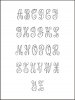
Anyway you will have the letters in a vector format, no in a TTF format, so you will not be able to type what you want from the keyboard. You should to copy and paste the letters each time you need one of they.
I am attaching a sample exported in a JPG format to show to you the typos.
PM me your e-mail address and the format of your choice and I will be glad of sending it to you.
Hi Leonardo. My email address is kparkes@shaw.ca I am usually good with a .jpg extension. If I am to copy and paste each letter each time, that is what I am doing now with the A to Z letters I have now. What I need to do often and can't do by copying and pasting (only can do by typing on the keyboard) is to bring the letters closer together in an interlocking position, where the letters are a bit overlapping one another. I cannot interlock the letters when I copy and paste, as it blocks the letters from showing on the sides. Part of the side of each letter disappears.
Is there a way to import whatever letters I need in Corel Draw 8 and be able to manipulate the imported individual letters to interlock to each other without having part of the letters disappear?
Hi Kelly,
Yes, there is a way to do that job when you import a letter or any graphic in a photographic format.
You should to edit the bitmap inside Corel; this option will open the Corel PhotoPaint program, and then inside it, cut out the background and save it again. Unfortunately I have my software in its Spanish version, so I am not able to give you better directions because I have not the menus tittles and options in English.
Anyway I will send to you the file saved in two vector format and you will be able to do with it what you need.
Cheers, Leonardo.
I got a good case of eye-burn looking through 10,000 fonts for you last night. I can't find that exact font anywhere. Too bad Leonardo's font isn't True Type font as that's the closest one I've seen.
Leonardoes upright script would be the nicest I've ever seen.
Just about all upright scripts are too modern and don't look quite right. They're also not true scripts but variations loosley put under the script heading. 99.9% of scripts by their very nature are supposed to be in italics.
You'll also find just about nothing in the free fonts on the internet but may have a better success in a pay font library.....................or you could beg Leonardo to send his one (or make it downloadable on the forum)to you and use it in Corel/Illustrator type programs :D